Before starting, ensure you have the following:
- A replacement SIM card supplied by the Support Team.
- A small cross-head screwdriver (included in the box) for removing the SIM card cover on the forward-facing camera.
- A Torx T7 screwdriver (included in the box) for removing the SIM card cover on the dual-facing camera.
Before You Start
- Park the vehicle safely.
- Turn the vehicle ignition off.
- Allow the camera to power down completely before removing or inserting the SIM card.
SIM Card Replacement Procedure
Step 1: Locate the SIM Card Cover, the SIM card slot is located behind the access cover on the side of the camera unit.
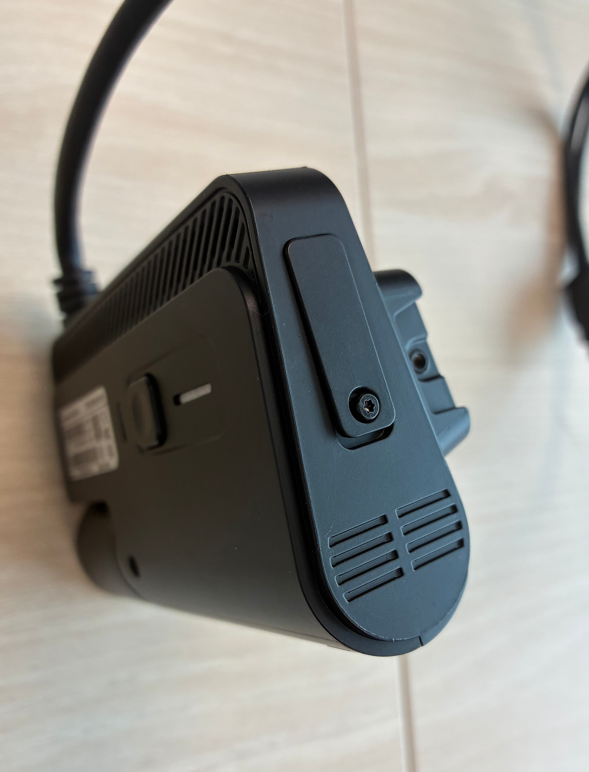
Step 2: Using a small screwdriver, carefully remove the retaining screw. Remove the access cover to expose the SIM card slot.
Step 3: Gently push the SIM card inwards until you feel a click, release the SIM and it will spring/pop out slightly. Carefully pull the SIM card out of the slot.
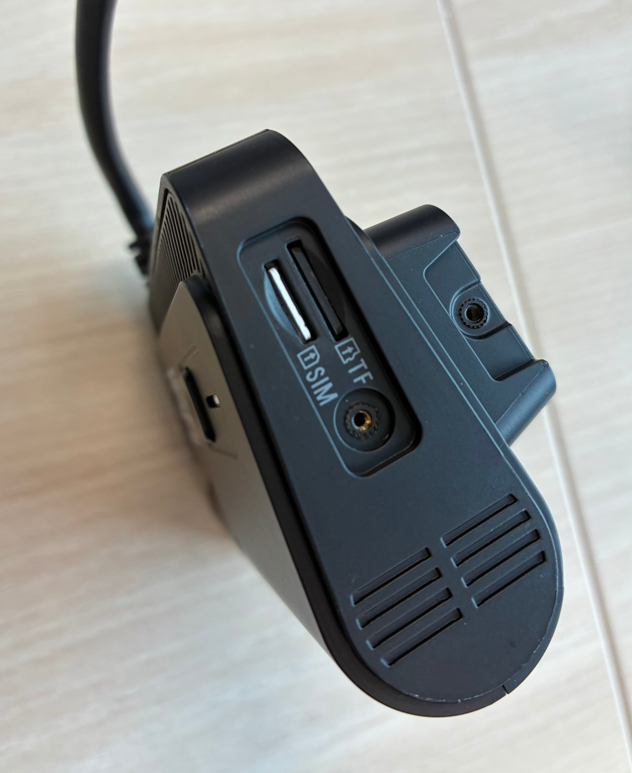
Step 4: Insert the new SIM card into the slot, ensure the SIM is oriented correctly and fully seated. Do not force the SIM into the holder.
Step 5: Replace the access cover, Reinstall and tighten the retaining screw(s).
Step 6: Turn the vehicle ignition on, allow the device several minutes to connect to the mobile network.
Checks After Installation
✅ Device powers up normally
✅ Link connection is established
✅ Live tracking/video is available on our telematics platform
If the device does not connect:
- Verify the SIM is seated correctly.
- Restart the device.
- Confirm the SIM has been replaced with our Support Team so they can update the SIM details on the platform.
- Allow several minutes for the device to reconnect to the mobile network.
Was this article helpful?
That’s Great!
Thank you for your feedback
Sorry! We couldn't be helpful
Thank you for your feedback
Feedback sent
We appreciate your effort and will try to fix the article